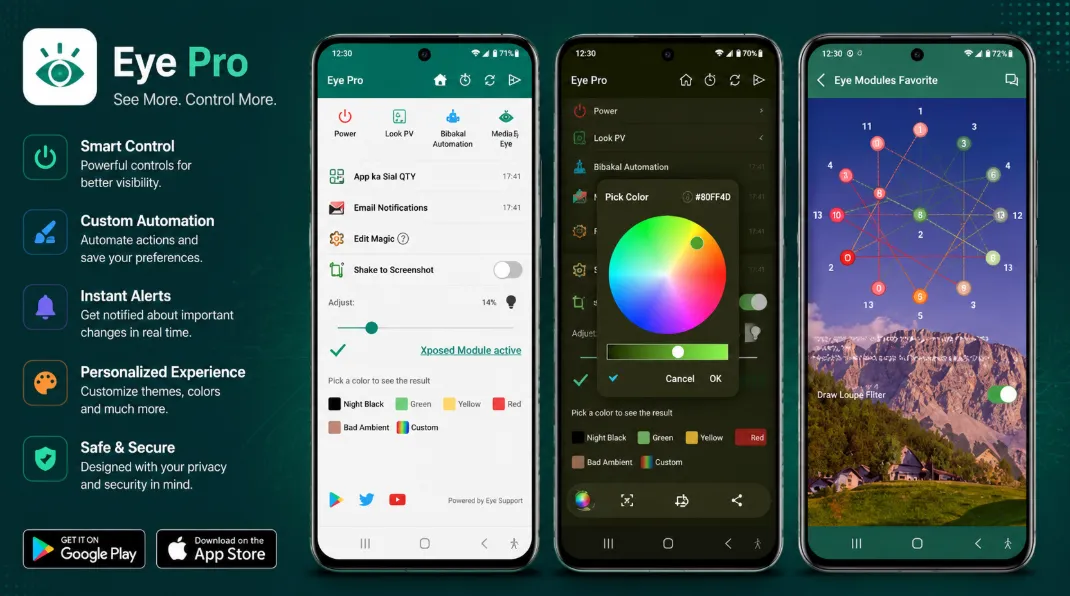
Reduce Blue Light and Protect Your Eyes
Introduction: Many people spend several hours every day using smartphones for work, study, entertainment, and social media. Extended screen exposure can sometimes cause eye strain, discomfort, and difficulty sleeping, especially during nighttime use. Eye Protector is an Android application designed to help reduce these issues by filtering blue light and providing screen protection features for more comfortable viewing. Gb9
The app focuses on reducing blue light exposure, lowering screen brightness beyond normal limits, and offering customizable display filters that may help users feel more comfortable during extended screen sessions.
What is Eye Protector?
Eye Protector is a blue light filtering application that places a colored overlay on the screen to reduce harsh light emitted from smartphones and tablets. Users can customize filter colors, brightness levels, and schedules according to their preferences.
The app is particularly useful for:
-
Nighttime reading
-
Social media browsing
-
Watching videos
-
Extended smartphone usage
-
Reducing screen glare in dark environments
Key Features
Blue Light Filter
The main feature of Eye Protector is its blue light reduction filter.
The app offers:
-
Red filter mode
-
Yellow filter mode
-
Black filter mode
-
Custom color filters
These options allow users to adjust the screen to a more comfortable viewing experience.
Custom Brightness Control
Eye Protector can reduce screen brightness beyond the standard Android settings, making it easier to use devices in dark environments without excessive glare.
Scheduled Activation
Users can create schedules that automatically activate eye protection filters during specific times, such as evening hours or before bedtime. This eliminates the need to manually enable protection every day.
Relaxation Features
The application includes relaxing images and eye-care tools intended to encourage healthier screen usage habits and periodic visual breaks.
Screenshot Tools
Eye Protector also includes a screenshot feature that allows users to quickly capture and share screenshots through device gestures.
User Experience
The application provides a lightweight and straightforward interface. Most settings can be adjusted quickly, making it suitable for both beginner and experienced Android users. The filters work immediately after activation and can be customized according to personal preferences.
The app uses Android Accessibility Services to extend protection coverage across notifications, navigation bars, and lock screens. According to the developer, sensitive user data is not collected through this feature.
Pros
-
Multiple blue light filter colors
-
Custom filter settings
-
Scheduled activation
-
Extra screen dimming
-
Lightweight design
-
Easy-to-use interface
-
Screenshot functionality
Cons
-
Contains advertisements in the free version
-
Requires accessibility permissions for some features
-
Blue light filters may slightly alter screen color accuracy
-
Effectiveness depends on individual user preferences
Final Verdict
Eye Protector is a useful Android app for users who spend long periods looking at smartphone screens, particularly during nighttime hours. Its blue light filtering options, customizable brightness controls, and automatic scheduling features make it a practical tool for improving screen comfort.
While it cannot replace healthy screen habits or professional eye care, it provides a convenient way to reduce harsh screen lighting and create a more comfortable viewing experience.