Satellite Director: Your Easy Guide to Finding TV Satellites
B09:- Finding the right TV satellite or antenna alignment can be a real challenge. Typically, users must perform multiple calculations involving GPS coordinates, magnetic variation, compass azimuth, and satellite…
B09:- Finding the right TV satellite or antenna alignment can be a real challenge. Typically, users must perform multiple calculations involving GPS coordinates, magnetic variation, compass azimuth, and satellite position to correctly locate a satellite. Satellite Director simplifies this process by automating these calculations and offering a clear, visual guide for perfect dish alignment.
Simplifying Satellite Alignment
With Satellite Director, users no longer need to rely on manual calculations or complicated tools. The app leverages your phone’s GPS location and compass sensors to determine the exact satellite position in the sky. Simply enable your GPS, choose your desired TV satellite from the list, and point your phone toward the sky. When the on-screen white and cyan markers align, you’ve found your satellite position.
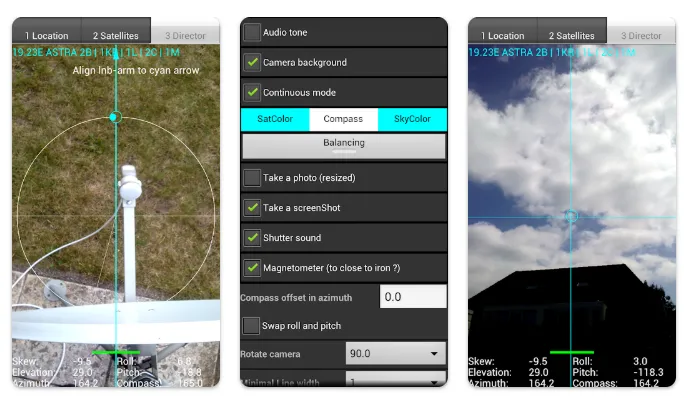
The app even includes a camera preview mode that overlays directional arrows, making it easier to visually align your satellite dish (LNB arm) in azimuth. Once the offset arm aligns with the cyan arrow on your display, your dish will be correctly oriented toward the satellite.
Key Features and Functionality
-
Sensor Integration: Utilizes your device’s GPS and compass for accurate positioning.
-
Camera Overlay: Mimics a “look-through view” or mirror effect to help align the dish visually.
-
No Ads or Data Collection: The app is 100% ad-free and does not collect personal or non-personal data.
-
Customizable Options: Features include adjustable audio tones, color pickers, continuous mode, and user-defined satellite positions.
-
Screenshot Support: Take a quick photo of your alignment setup to review later; screenshots are stored directly on your phone’s memory.
-
Satellite Database: Includes a list of 280 satellites with data derived from AGI’s reliable database.
-
Magnetic Interference Warning: Provides a colored bar (green/yellow/red) to indicate proximity to metal objects that can distort compass accuracy.
Important Warnings and Tips
To use Satellite Director, your phone or tablet must have a built-in compass. Devices without a compass will not support the app. Additionally, metal phone cases or covers with magnetic closures can disrupt the compass, leading to inaccurate readings. Always remove such covers before using the app.
Users should also calibrate their compass before starting. This can be done by waving the phone in a figure-eight motion or rolling it along its length axis a few times. The quality of your phone’s hardware plays a significant role in determining the accuracy of your satellite alignment.
Compatibility Notes
Be aware that some custom Android systems, like CyanogenMod (Cymod), may cause compatibility issues. These are due to software-level differences, not the app itself. If you encounter problems, the issue lies with the modified Android version.
Why It Stands Out
Unlike many satellite finder apps, Satellite Director remains entirely ad-free and privacy-focused. It does not require unnecessary permissions and uses only essential data for accurate functionality. The developer also provides support via email and offers older versions for download through their official site.
Tips for Success
-
Maintain a distance of at least 30 cm from metallic objects like the dish or pole.
-
Always calibrate the compass before using the app.
-
Optionally, perform a secondary calibration by rolling the phone along its axis 2–3 times.
In summary, Satellite Director is a reliable, precise, and privacy-friendly tool that transforms satellite dish alignment into a straightforward task. With its smart sensor integration, intuitive camera overlay, and zero-ad policy, it’s a must-have app for anyone setting up or adjusting a satellite dish.