DiskDigger Photo Recovery Review: The Digital Archaeologist for Your Smartphone
V09:- We’ve all experienced that heart-stopping moment: accidentally hitting "delete" on a cherished photo or formatting a memory card only to realize it held irreplaceable videos. In the world of mobile storage, where…
V09:- We’ve all experienced that heart-stopping moment: accidentally hitting "delete" on a cherished photo or formatting a memory card only to realize it held irreplaceable videos. In the world of mobile storage, where a "Recycle Bin" isn't always standard, data loss can feel permanent.
DiskDigger Photo Recovery (developed by Defiant Technologies) has long been the go-to solution for millions of Android users. Known for its "no-nonsense" interface and powerful scanning engine, it acts as a digital safety net for your lost media. In this review, we’ll explore how it works, the crucial difference between its scanning modes, and whether it’s the right tool to rescue your memories.
What is DiskDigger?
DiskDigger is a specialized undelete utility designed to recover lost photos and videos from your device's internal memory or external SD card. It works by scanning the storage partitions for data that the Android operating system has marked as "available" but hasn't yet physically overwritten with new files.
Two Ways to Scan: Root vs. Non-Root
One of the most important things to understand about DiskDigger is how its performance changes depending on your device's system permissions.
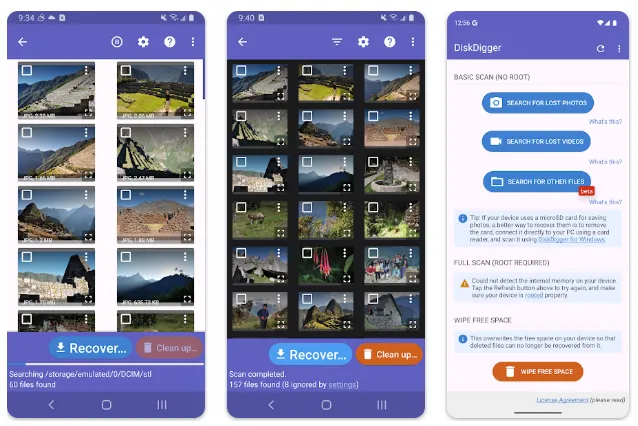
1. The "Basic Scan" (No Root Required)
If your device is not rooted, DiskDigger performs a "limited" scan. In this mode, the app searches your device’s thumbnail caches and database files for traces of your photos.
-
The Benefit: It is safe, requires no technical modifications to your phone, and can often find recently deleted photos.
-
The Catch: Because it relies on thumbnails, the recovered images may be lower resolution than the originals.
2. The "Full Scan" (Root Access Required)
For users with rooted devices, DiskDigger unlocks its full potential. It can bypass system restrictions to search the entire raw memory partition.
-
The Benefit: This allows for the recovery of full-resolution photos, original video files, and a much wider variety of file formats.
-
The Catch: Rooting a device can be complex and may void your warranty.
Key Features & Functionality
1. Flexible Recovery Options
Once DiskDigger finds your lost files, it doesn't just put them back where they were (which could accidentally overwrite other deleted data). It offers three professional-grade save methods:
-
Cloud Integration: Upload recovered files directly to Google Drive or Dropbox.
-
Email: Send the files to yourself as an attachment.
-
Local Save: Save the files to a different folder or an external SD card to avoid data corruption.
2. Advanced Filtering and Search
When scanning a large device, you may be presented with thousands of images—including icons from other apps and web cache. DiskDigger includes a "Settings" gear icon that allows you to filter results by file size and file type, helping you ignore junk and focus on your high-quality personal photos.
3. "Wipe Free Space" & Privacy Tools
DiskDigger isn't just for recovery; it’s also a powerful privacy tool.
-
Wipe Free Space: This feature allows you to permanently erase the "empty" space on your phone so that previously deleted files can never be recovered by anyone else.
-
Clean Up: A built-in utility to find and delete unnecessary thumbnails or cache files that are hogging your storage.
Technical Specifications
| Feature | Details |
| Developer | Defiant Technologies, LLC |
| Free Version | Recovers Photos and Videos |
| Pro Version | Recovers documents, music, archives, etc. |
| Android Version | 7.0 and up (varies by device) |
| Scanning Tech | Thumbnail cache (Basic) / Raw Partition (Full/Root) |
| Price | Free (with a paid Pro version available) |
The Pros and Cons
The Pros:
-
Reliability: One of the most trusted names in Android recovery for over a decade.
-
No-Cost Entry: You can recover as many photos as you want in the free version.
-
Lightweight: The app size is incredibly small (under 6MB), so it won't clutter your phone.
-
Safe: "Read-only" scanning ensures the app doesn't damage your existing data.
The Cons:
-
Limited Quality on Non-Root: Basic scans are often limited to lower-resolution thumbnails.
-
Utilitarian Design: The interface is functional but lacks the "glossy" look of modern design apps.
-
Overwrite Risk: Like all recovery software, it cannot recover data that has already been overwritten by new files.
Final Verdict: Is DiskDigger Worth It?
If you are currently panicking over a lost photo, DiskDigger is the first app you should download. It is transparent about its capabilities, easy to use, and doesn't hide its primary recovery functions behind a paywall.
Pro Tip: For the best results, stop using your phone immediately after you realize a file is missing. The less you use your phone, the lower the chance that your deleted photo will be overwritten by new data!