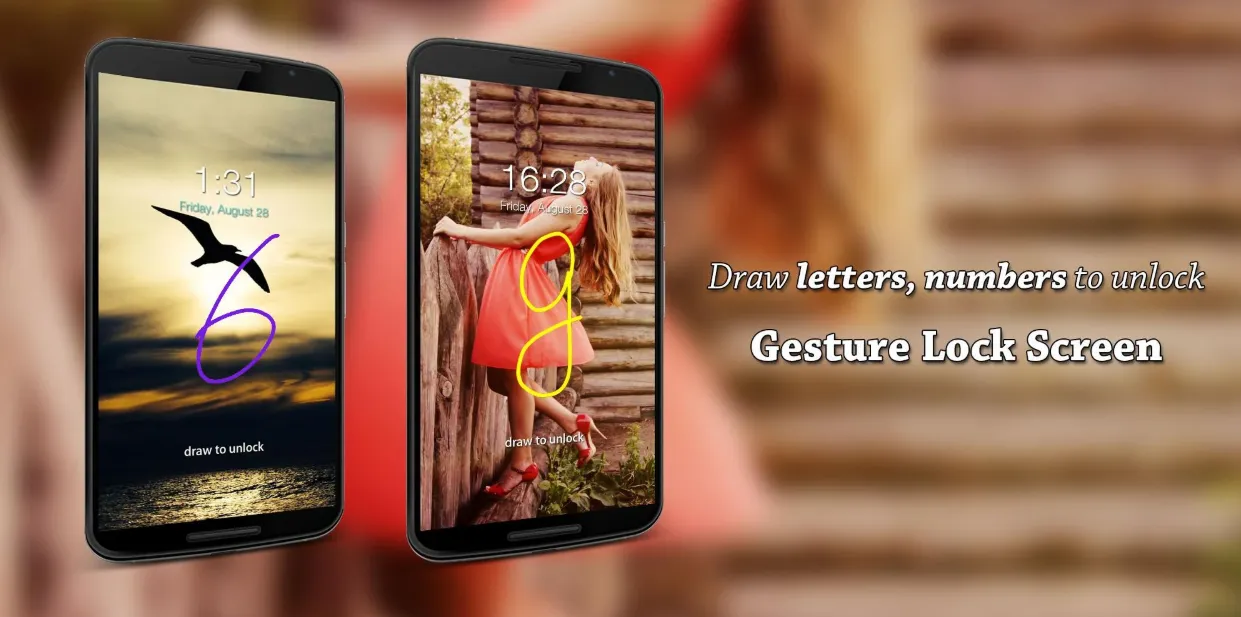
Gesture Lock Screen – Unlock Your Phone Your Way
Gesture Lock Screen lets you unlock your phone in a unique and personal way — by drawing a custom gesture. You can set letters, numbers, symbols, signatures, or any shape as your password, making your lock screen truly yours. Whether you prefer a single quick stroke or multiple gesture lines, the app’s gesture sensitivity settings let you fine-tune how your phone recognizes your drawings. You can even choose between invisible, solid, or transparent gesture colors to match your style.
Intruder Selfie – Catch Unauthorized Access
Keep your device safe from prying eyes with Intruder Selfie. If someone enters the wrong gesture or PIN, the app automatically snaps a photo of them. You can send the intruder alert and photo directly to your email, view the date and time of the attempt, and store all intruder photos in a secure folder. Customize the number of wrong attempts allowed and receive notifications when an intrusion is detected.
Smart Notifications on Lock Screen
Stay updated without unlocking your device. Gesture Lock Screen supports lock screen notifications for Android 4.3 and newer, showing unread messages, missed calls, music controls, alarms, and more. You can hide sensitive content, tap once or twice to unlock with your gesture, and swipe away notifications you don’t need. Customize the background, text color, size, and position of notifications to fit your preferences.
Enhanced Security with Recovery Options
If you forget your gesture, you can unlock your phone with a secure 4–8 digit recovery password. This ensures you never get locked out while still keeping your device secure. Gesture Lock Screen works as both a gesture lock and a secure keypad lock screen.
Fully Customizable Look and Feel
Personalize your lock screen with wallpapers from your local gallery or explore beautiful Unsplash online wallpapers. Customize date and time formats, set custom lock/unlock/error sounds, and choose from various unlock animations. With Gesture Lock Screen, you get a DIY lock screen experience that matches your personality.
Advanced Features
You can turn off and lock your phone without pressing the physical power button — perfect for preserving hardware buttons. Just one tap locks your phone instantly. The app uses Device Administrator permission to enable secure locking and Accessibility API to keep your lock screen active during phone calls. Rest assured, no personal data is collected or shared.
010
Unlock with Style and Security
Download Gesture Lock Screen today, set your own creative gesture password, and enjoy a lock screen that combines security, customization, and personality. Whether you want a stylish unlock method, extra privacy with intruder alerts, or full control over notifications, Gesture Lock Screen delivers it all.