Device Info App Review – Complete Hardware & Software Analysis Tool
Smartphones today are packed with advanced technology, and most users rarely know the full potential of their devices. That’s where Device Info comes in. It is a powerful and user-friendly mobile application designed to give you detailed insights into your phone’s hardware and software. From real-time monitoring of your CPU and GPU to running device tests and analyzing apps, this tool is like having a complete diagnostic kit right in your pocket.
Dashboard – Instant Overview of Your Device
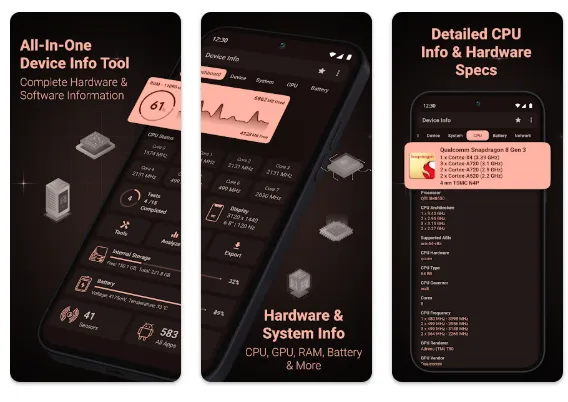
The app starts with a clean dashboard that summarizes the most important details about your device. You get quick access to your RAM usage, internal and external storage, battery status, CPU details, available sensors, and installed apps. This provides a quick snapshot without diving deep into menus, making it ideal for both casual users and professionals.
Detailed Device Information
Device Info offers a comprehensive Device tab that shows everything from your phone’s name, model, manufacturer, and build fingerprint to more advanced details like IMEI, SIM serial, network operator, and hardware board details. Knowing your device’s exact age, manufactured date, and brand details can be very useful, especially when troubleshooting or buying a second-hand phone.
System and OS Insights
The System section gives complete knowledge about your operating system. It covers OS version, API level, security patch, bootloader, baseband, Java VM, and kernel details. For advanced users, it even shows Vulkan support, Treble compatibility, and OpenGL ES. This makes it easier to check whether your phone is updated, secure, and optimized for modern apps.
CPU and GPU Monitoring
For performance enthusiasts, the CPU tab is a highlight. You can view your processor architecture, governor, frequency, number of cores, GPU renderer, GPU vendor, and supported ABIs. This helps you understand how powerful your device is and whether it’s running at its full potential.
Battery Health and Performance
The Battery section is extremely detailed, showing health, charging status, temperature, voltage, power usage, and capacity in real time. This is especially useful for users experiencing battery drain issues. With this feature, you can easily monitor how your device handles power and make adjustments if needed.
Network and Connectivity
Device Info provides a complete breakdown of your WiFi, Bluetooth, NFC, and network details. You can check IP address, DNS, gateway, frequency, and WiFi standard. The built-in WiFi Analyzer is a standout feature, allowing you to evaluate nearby WiFi networks and identify the strongest and most stable connection.
Sensors and Camera Details
The app lists every available sensor in your device, along with its vendor, power, type, and range. This is very helpful for developers and advanced users testing device compatibility. The Camera section is equally detailed, showing aperture, focal length, ISO range, supported modes, and RAW capabilities—features that photography enthusiasts will appreciate.014
Extra Tools and Testing Options
Beyond just monitoring, Device Info also includes benchmark and testing tools for components like display, multitouch, flashlight, loudspeaker, microphone, vibration, Bluetooth, and fingerprint sensors. You can run hardware tests to ensure everything is functioning properly.
Other helpful tools include an App Analyzer, Permission Analyzer, and the ability to export reports in text or PDF format. The app even supports customizable widgets so you can keep vital information on your home screen.
User Experience and Design
Device Info supports light and dark themes with material design, making it visually appealing and easy to navigate. The app runs smoothly without draining resources, and its customizable widgets ensure that important details like CPU usage, battery health, and memory are always accessible.
Final Verdict
Device Info is more than just a system monitoring app—it’s a complete diagnostic, performance, and testing toolkit for Android users. Whether you’re a casual user who wants to check your battery health or a developer who needs advanced details about CPU, GPU, and sensors, this app has you covered.
With its clean interface, comprehensive features, real-time monitoring, and extra tools like WiFi Analyzer and App Analyzer, Device Info stands out as one of the best all-in-one hardware and software analysis apps available today.