A Comprehensive Review of the Eye Protector – Bluelight Filter App
B06:- In our digital-first world, "screen time" is no longer just a metric; it's a lifestyle. However, prolonged exposure to the high-energy blue light emitted by our smartphones can lead to digital eye strain, headaches, and disrupted sleep cycles. While many phones have a basic "Night Light" feature, specialized apps like Eye Protector: Bluelight Filter (developed by Courysky) offer a more powerful, customizable solution for dedicated night owls and professionals.
In this review, we’ll explore how this app helps you "read with ease" and why it has earned a 4.7-star rating from millions of users.
The Science of Blue Light and Your Sleep
The blue light spectrum (380-550nm) is essential during the day for keeping us alert. However, at night, this same light suppresses melatonin—the hormone responsible for sleep. By shifting your screen’s color temperature to warmer tones, Eye Protector mimics natural light patterns, signaling to your brain that it is time to wind down.
Key Features: Total Control Over Your Display
1. Multi-Color Filter Options
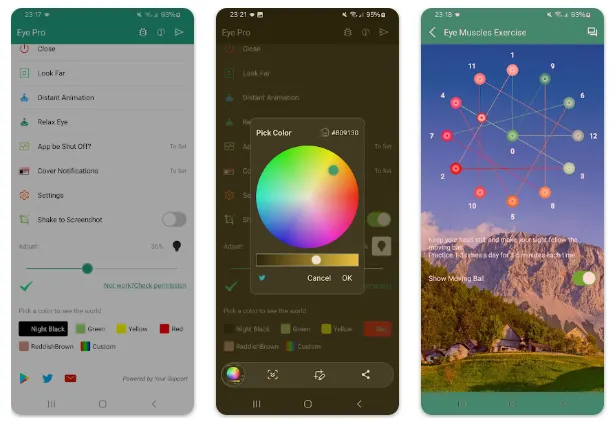
Unlike system settings that usually only offer one "yellow" tint, Eye Protector provides a palette of presets tailored to different environments:
-
Black Filter: Ideal for total darkness to minimize brightness beyond system limits.
-
Red & Yellow Filters: Specifically designed to block the highest levels of blue light.
-
Custom Filters: Choose a color that feels most comfortable for your unique vision needs.
2. Intelligent Scheduling
You don't have to remember to turn your protection on every evening. The Scheduled Task feature allows you to automate the filter. You can set it to activate exactly at sunset or at a specific time when you start your nightly reading, ensuring your eyes are always guarded.
3. "Shake to Share" Screenshots
A unique utility within this app is the Shake to Catch function. It allows you to take and share screenshots simply by shaking your phone. This is particularly useful for those who use their phones one-handed or want to quickly capture a moment without fumbling for button combinations.
4. Accessibility and Full Coverage
On newer Android versions, many filter apps fail to cover the notification bar or the navigation buttons. Eye Protector utilizes Accessibility Services to ensure the filter covers 100% of your screen, including the lock screen and system menus, providing a truly consistent viewing experience.
Performance and User Experience
The app is remarkably lightweight, with an APK size of just around 5.6 MB. This means it won't bloat your storage or drain your battery significantly while running in the background.
-
Stability: Users report that the app is highly stable and doesn't "flicker" like some lower-quality dimmers.
-
Simplicity: The interface is straightforward—one tap to activate and a simple slider to adjust intensity.
-
Privacy: The developer explicitly states that sensitive data is not collected, even when the Accessibility Service is enabled.
Technical Specifications at a Glance
| Feature | Details |
| Developer | Courysky (com.yaojian.protecteye) |
| Filter Modes | Black, Red, Yellow, Custom |
| Special Functions | Shake-to-Screenshot, Relaxing Images |
| Automation | Full Scheduling Support |
| Android Version | 5.1 and higher |
| Price | Free (Pro version available) |
The Pros and Cons
The Pros:
-
Deep Dimming: Can make the screen darker than the phone's lowest hardware setting.
-
No "Over Other Apps" Needed: Works on phones that lack the "Display Over Other Apps" permission.
-
Highly Rated: Backed by over 1 million downloads and a 4.65+ star average.
-
Low Battery Impact: Optimized for efficiency.
The Cons:
-
Ads: The free version contains ads at the bottom of the settings page.
-
Initial Setup: Requires a moment to grant permissions for full-screen coverage.
Final Verdict: Is It Essential?
If you frequently find yourself scrolling through social media or reading e-books at 2:00 AM, Eye Protector: Bluelight Filter is a must-have tool. It turns your bright, piercing screen into a soft, paper-like display that is gentle on the eyes. For users who want a stable, ad-free, and even lighter experience, the Pro version is also available and highly recommended.
Protect your vision today—your future self will thank you for the better sleep.