Spatial Touch™ – Touchless AI Control for Your Phone
B08: Control videos, social media, and media apps without touching the screen — intuitive AI gesture interaction for hands-free navigation and playback.
Spatial Touch™ is an innovative Android app that lets you control your phone using air gestures and AI-powered hand tracking — no physical touch required. Instead of tapping the screen, wave or gesture in front of your camera to play/pause videos, skip content, adjust volume, scroll, and navigate supported media and social apps.
With growing demand for more intuitive, hands-free interaction — especially while watching videos, cooking, eating, or when your hands are otherwise occupied — Spatial Touch™ gives users a new way to interact with their device without contact.
🔍 What It Does
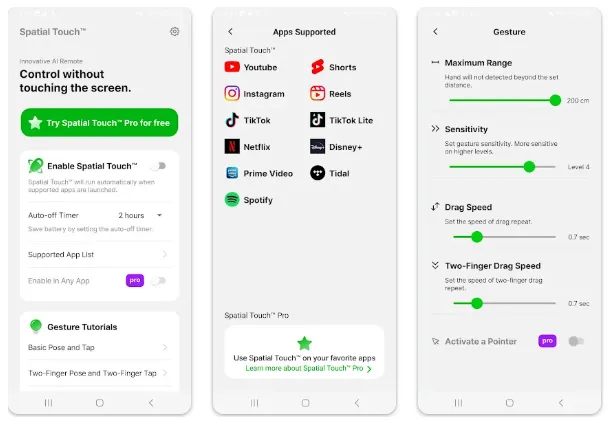
Spatial Touch™ uses on-device AI gesture recognition to detect your hand movements and translate them into commands for your device. It works with popular media platforms and social apps, enabling you to control playback and navigation from a short distance — typically up to around 2 metres — without ever touching the screen.
Typical use cases include:
-
Play / pause videos
-
Skip ads or move to the next video
-
Adjust volume
-
Scroll content
-
Navigate social feeds
-
Control playback in streaming apps from a distance
Because all gesture processing happens locally on your phone and doesn’t transmit images externally, Spatial Touch™ emphasizes privacy while using your camera only when supported apps are active.
⭐ Key Features
🤖 AI-Powered Air Gestures
Control your device using natural hand movements — swipe, wave, or gesture in the air — without touching your screen.
📺 Hands-Free Media Control
Navigate videos, adjust volume, and scroll content in apps such as YouTube, Netflix, Instagram, TikTok, and others (with more apps being added over time).
☁️ Background Auto-Start
Once installed, Spatial Touch™ can activate automatically when you open a supported media app, running behind the scenes so you don’t have to launch it manually.
🔒 On-Device Processing
Gestures are interpreted on your phone without transmitting camera data elsewhere. The camera activates only when necessary and turns off automatically outside supported apps.
📏 Distance Interaction
Gesture control works from a short distance — designed to work comfortably when you aren’t right next to your phone.
📊 Installation & Stats
Spatial Touch™ has been downloaded over 10 million times and maintains roughly a 3.9-star rating from thousands of reviews on Google Play, indicating broad interest with mixed feedback about performance and gesture accuracy.
The app is free to install and offers ads and in-app purchases, meaning monetization options like premium features or subscriptions are available.
👍 User Experience & Practical Use
Best for:
-
People who want hands-free control while watching video content
-
Users whose hands are occupied, wet, or messy
-
Long-distance control while lounging or cooking
Limitations:
-
Requires proper lighting and camera visibility for reliable gesture detection
-
Works best with supported media platforms
-
Some users report occasional recognition challenges depending on device and environment
📈 Why It Matters
Spatial Touch™ brings a new interaction layer to everyday smartphone use, especially during media playback. It blends AI, computer vision, and natural gestures to create a controller-like experience using only your hands — no accessories required.
This hands-free approach may appeal to users seeking convenience, accessibility options, or novel ways to interact with content without direct screen contact.
📌 Summary
Spatial Touch™ is a hands-free control app that transforms your front camera into an AI gesture detector, letting you manage media playback and navigation without touching your device.
With support for major streaming and social apps, intuitive air gestures, and automatic activation, it offers a futuristic and practical way to interact with your phone — though lighting conditions and gesture recognition accuracy may vary by device.